For taxpayers looking for a fast, secure, and cost‑free way to pay federal taxes, IRS Direct Pay has become one of the most reliable tools available. Whether you owe a balance on your Form 1040, need to make estimated tax payments, or want to schedule a payment in advance, this online service offers a streamlined alternative to mailing checks or paying third‑party processing fees. According to the IRS, Direct Pay allows individuals and businesses to send payments directly from a bank account without creating an account or paying service charges.
As the IRS continues modernizing its payment systems, electronic payments are quickly becoming the standard. In fact, recent updates show the agency is phasing out paper checks for federal tax payments, signaling a long‑term shift toward digital tax administration. For taxpayers, this means now is the ideal time to understand how IRS Direct Pay works and why it may be the most convenient option for managing federal tax obligations.
What Is IRS Direct Pay?
IRS Direct Pay is a free online payment portal that transfers funds directly from your checking or savings account to the U.S. Treasury. Unlike credit‑card payment processors, it does not charge fees, and unlike the Electronic Federal Tax Payment System (EFTPS), it does not require a separate enrollment process. You simply verify your identity, enter your tax information, and submit your payment.
The service supports a wide range of tax payments, including:
- Balance due payments for Form 1040
- Estimated tax payments for individuals
- Extension payments
- Amended return payments
- Installment agreement payments
- Business tax payments, including payroll and corporate filings (up to $10 million per payment)
It’s important to note that IRS Direct Pay is for payments only refunds must still be tracked through the “Where’s My Refund?” tool.
Why More Taxpayers Are Using IRS Direct Pay
1. It’s Free and Secure
The IRS emphasizes that Direct Pay is both free and secure, using encrypted connections and identity verification to protect taxpayer information.
2. No Account Required
Unlike other IRS systems, you don’t need to create a login. This makes it ideal for taxpayers who want a quick, one‑time payment option.
3. No Third‑Party Fees
Paying by credit card can cost 1.85%–2.5% in processing fees. Direct Pay eliminates these charges entirely.
4. Flexible Scheduling
You can schedule payments up to 365 days in advance, helping you avoid last‑minute stress and potential penalties.
5. Instant Confirmation
After submitting a payment, you receive a confirmation number and email receipt critical for recordkeeping and audit protection.
Who Can Use Direct Pay?
Most U.S. taxpayers qualify, but there are a few requirements:
Individuals
- Must have filed a federal tax return within the past six years (used for identity verification).
- W‑2 employees, retirees, freelancers, and independent contractors all qualify.
Businesses
- Must have an EIN and a U.S.‑based business bank account.
- Eligible entities include LLCs, S corporations, C corporations, and nonprofits.
Limitations
- Payments cannot exceed $10 million; larger payments must use EFTPS or same‑day wire.
- Some foreign banks and certain fintech platforms may not be compatible.
How to Make a Payment Using IRS Direct Pay
The process is straightforward and typically takes less than 10 minutes. Here’s a step‑by‑step overview based on current IRS guidance and tax‑professional recommendations:
Step 1: Visit the IRS Direct Pay Portal
Navigate to the IRS website and select “Direct Pay with bank account.”
Step 2: Choose Your Payment Type
Common options include:
- Balance Due
- Estimated Tax
- Extension
- Installment Agreement
Then select the tax form (e.g., Form 1040, 1040‑ES) and tax year.
Step 3: Verify Your Identity
You’ll need information from a previously filed tax return, including:
- Filing status
- Name and SSN/ITIN
- Address
- Date of birth
- Prior‑year tax return details
Step 4: Enter Payment and Bank Information
Provide your routing and account numbers, payment amount, and payment date.
Step 5: Review and Submit
After reviewing your details, agree to the disclosure statement and submit your payment. You’ll receive a confirmation number immediately.
Tips for Using Direct Pay Effectively
- Double‑check your bank information. Errors can delay processing by up to five business days.
- Submit payments before 8 PM ET on tax deadlines to avoid penalties.
- Save your confirmation number and email receipt for your records.
- Use the IRS Online Account to track payment status within 48 hours.
Direct Pay vs. Other Payment Options
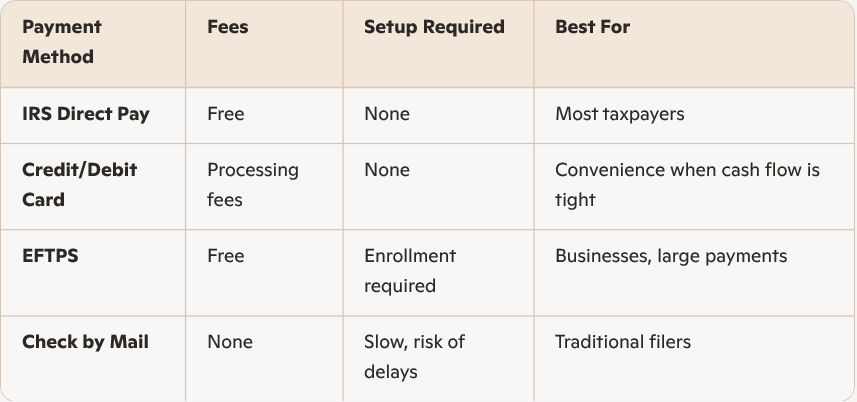
Given the IRS’s move away from paper checks, IRS Direct Pay is increasingly the most efficient option.
Final Thoughts
As the IRS continues modernizing its payment systems, IRS Direct Pay stands out as the simplest, most cost‑effective way for individuals and businesses to pay federal taxes. It’s secure, fast, and free making it an essential tool for anyone looking to stay compliant without unnecessary hassle or fees. Whether you’re paying a balance due, making estimated payments, or scheduling next year’s tax obligations, IRS Direct Pay offers a streamlined solution that keeps your financial life running smoothly.