E-filing 1099s has shifted from being optional to mandatory for most small businesses. With the IRS lowering the threshold from 250 returns to just 10 total information returns (including W-2s, 1098s, and 1099s), nearly every employer and contractor-based business must now file electronically. This blog post will walk you through the process step by step, highlight common pitfalls, and provide insights to help your business stay compliant and avoid penalties.
What Changed for 2025?
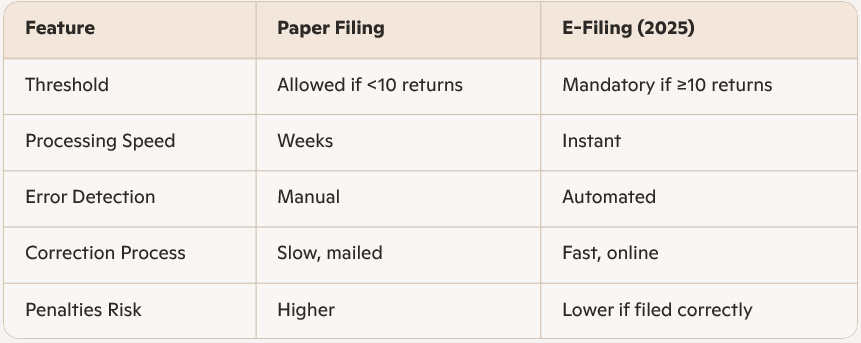
- Mandatory E-Filing: If you file 10 or more information returns, you must e-file. This includes all forms combined, not just 1099s.
- TIN Matching Requirements: The IRS now requires exact matches between recipient names and Taxpayer Identification Numbers (TINs). Incorrect matches result in immediate rejection.
- Deadlines:
- January 31, 2026 – Contractors must receive their 1099-NEC forms.
- March 31, 2026 – IRS electronic filing deadline.
- Penalty Structure: Late filings can cost $60–$310 per form depending on how late you file.
Step-by-Step Guide on How to E-File 1099s
1. Gather Accurate Information
Before logging into any IRS system, ensure you have:
- Payer details: Legal name, address, and Employer Identification Number (EIN).
- Recipient details: Completed W-9 forms with correct names and TINs.
- Payment data: Nonemployee compensation (Box 1 of 1099-NEC), rents, royalties, or other reportable payments on 1099-MISC.
2. Use IRS E-Filing Systems
The IRS offers multiple platforms:
- IRIS (Information Returns Intake System): Designed for small businesses, user-friendly, and accessible via IRS.gov.
- FIRE (Filing Information Returns Electronically): Legacy system, still in use for bulk filers.
- Approved Providers: Many payroll and accounting software platforms integrate directly with IRS e-filing.
3. Perform TIN Matching
TIN mismatches are the #1 reason for rejection. Use the IRS TIN Matching Program to verify contractor details before filing.
4. File Before Deadlines
- Issue 1099-NEC forms to contractors by January 31.
- Submit electronically to the IRS by March 31.
5. Correct Errors Promptly
If a form is rejected, correct it immediately using the same system. Avoid checking the “VOID” box on paper forms, as this prevents IRS processing.
Common Mistakes to Avoid When Figuring Out How to E-File 1099s
- Assuming the 250-return threshold still applies. It’s now 10 returns total.
- Incorrect TINs or names. Always verify with W-9 forms and IRS TIN Matching.
- Missing deadlines. Penalties escalate quickly after January 31.
- Manual errors. Misreporting payment categories (e.g., putting rent in Box 1 instead of Box 3).
Benefits of E-Filing
- Faster processing: IRS accepts electronic forms instantly.
- Reduced errors: Built-in validation checks catch mistakes before submission.
- Cost savings: Avoid late penalties and reduce administrative burden.
- Compliance assurance: Meets IRS requirements and avoids rejection.
Comparison: Paper Filing vs. E-Filing
Final Thoughts on How to E-File 1099s
E-filing 1099s in 2025 is no longer optional—it’s a compliance requirement for nearly all businesses. By preparing accurate data, using IRS-approved systems, and performing TIN matching early, you can avoid costly penalties and streamline your tax reporting.
Action Step: Start gathering W-9s and contractor payment data now. Don’t wait until January—TIN matching delays can take up to 5 days during peak season.